PRESENTATION MANAGEMENT SOFTWARE FOR POWERPOINT

PRESENTATION MANAGEMENT SOFTWARE
FOR POWERPOINT

Manage every slide.
From one place.

The presentation management platform built for PowerPoint teams.
One central slide library, version-controlled, with search inside every slide.

The presentation management platform built for PowerPoint teams. One central slide library, version-controlled, with search inside every slide.

The presentation management platform built for PowerPoint teams. One central slide library, version-controlled, with search inside every slide.

Trusted by teams at

Los Angeles Times Logo
McDonald's Logo
Alberici Logo
Teleflex Logo
Los Angeles Times Logo
McDonalds Logo
Grifols Logo
Alberici Logo
Teleflex Logo
Los Angeles Times logo
McDonald's Logo
Alberici Logo
Teleflex Logo

Find any slide in seconds. Search every presentation.

Find any slide in seconds.
Build decks faster.

Search inside your slides -- not just titles. SlideCamp reads every word on every slide so your team finds

exactly what they need. Drag and drop directly into PowerPoint. Presentation management and slide building, without switching tools.

Search inside your slides -- not just titles. SlideCamp reads every word on every slide so your team finds exactly what they need. Drag and drop directly into PowerPoint. Presentation management and slide building, without switching tools.

PowerPoint version
control, built in.

PowerPoint version
control, built in.

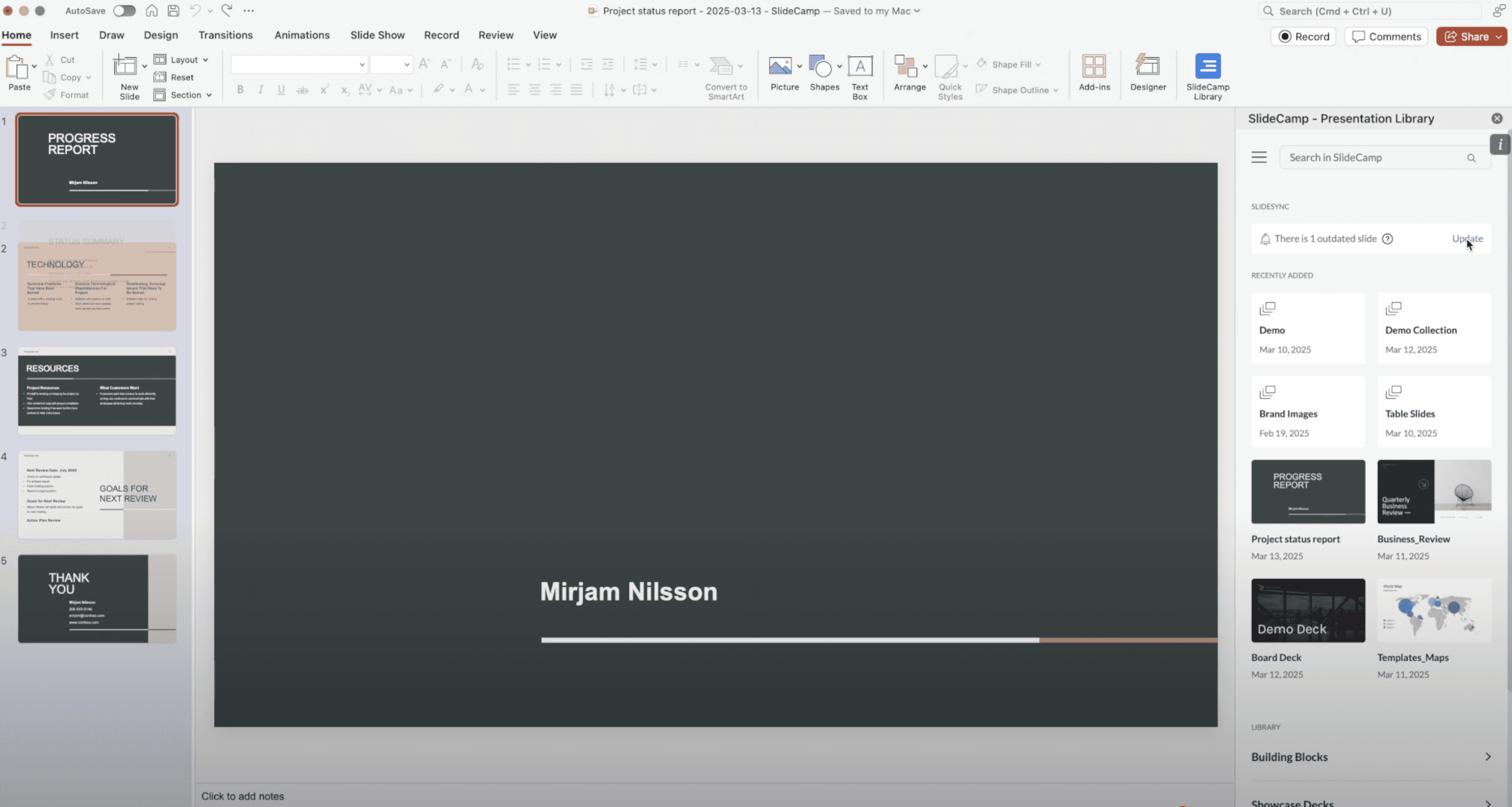
SlideSync gives you real PowerPoint version control. When a slide changes, every deck that uses it stays current automatically. One source of truth, version-controlled, with a one-click update for the team. No more outdated slides going to clients.

Presentation management, inside PowerPoint.

Presentation management, inside PowerPoint.

Presentation management without switching apps. SlideCamp runs inside PowerPoint, so your team manages, builds, and updates every deck without leaving the tool they already use.


See which slides
win across your team.

View analytics on top-performing decks and slides in one dashboard. Spot the content your best reps use and share those winning examples company-wide.

See what works across your team.

Find any slide in seconds. Search every presentation.

Search inside your slides — not just titles. SlideCamp reads every word on every slide so your team finds exactly what they need. Drag and drop directly into PowerPoint.

PowerPoint version
control, built in.

SlideSync gives you real PowerPoint version control. When a slide changes, every deck that uses it stays current automatically. One source of truth, version-controlled, with a one-click update for the team. No more outdated slides going to clients.

Presentation management,
inside PowerPoint.

Presentation management without switching apps. SlideCamp runs inside PowerPoint, so your team manages, builds, and updates every deck without leaving the tool they already use.


See what works across your team.

View analytics on top-performing decks and slides in one dashboard. Spot the content your best reps use and share those winning examples company-wide.

What our customers are actually seeing.

Teams using SlideCamp spend less time building decks and more time selling. Here's what they're seeing after the first 90 days. No custom setup required.

1

Source of truth

40-60%

Faster deck creation

90%

Less slide hunting

100%

Inside PowerPoint

"SlideCamp turned a 2‑hour deck build into 10 minutes. Marketing finally sleeps!"

David Purdue ( LA Times)

National Marketing Manager

"Reps create their own decks and every slide stays on‑brand. Freedom and control in one tool."

Danielle Hazarian (Teleflex)

Global Marketing Director

"The PowerPoint add-in has been a game changer. Nearly everyone on the team is using it now."

Bill Bond

Sales Director, CTM

POWERPOINT VERSION CONTROL

See how one update reaches every deck.

Watch how SlideCamp keeps slides in sync across all your presentations. Change it once, every deck follows. No more chasing down outdated content.

"SlideCamp turned a 2-hour deck build into 10 minutes. Marketing finally sleeps!"

"SlideCamp turned a 2-hour deck build into 10 minutes. Marketing finally sleeps!"

"SlideCamp turned a 2-hour deck build into 10 minutes. Marketing finally sleeps!"

David Purdue

National Marketing Manager

National Marketing Manager

LA Times

LA Times

Book a personalized walkthrough

Book a personalized walkthrough

We'll look at how your team handles presentations today and show you where SlideCamp fits in.

20 minutes. Tailored to your team's workflow.

Get your free demo

Get your free demo

20 minutes. Tailored to your team's workflow.

20 minutes. Tailored to your team's workflow.

Get your free demo

FAQ

Common questions about presentation management

What is presentation management software?

How does PowerPoint version control work in SlideCamp?

Is SlideCamp a presentation management tool or a slide library?

Who is SlideCamp's presentation management software for?

FAQ

Common questions about presentation management

What is presentation management software?

How does PowerPoint version control work in SlideCamp?

Is SlideCamp a presentation management tool or a slide library?

Who is SlideCamp's presentation management software for?